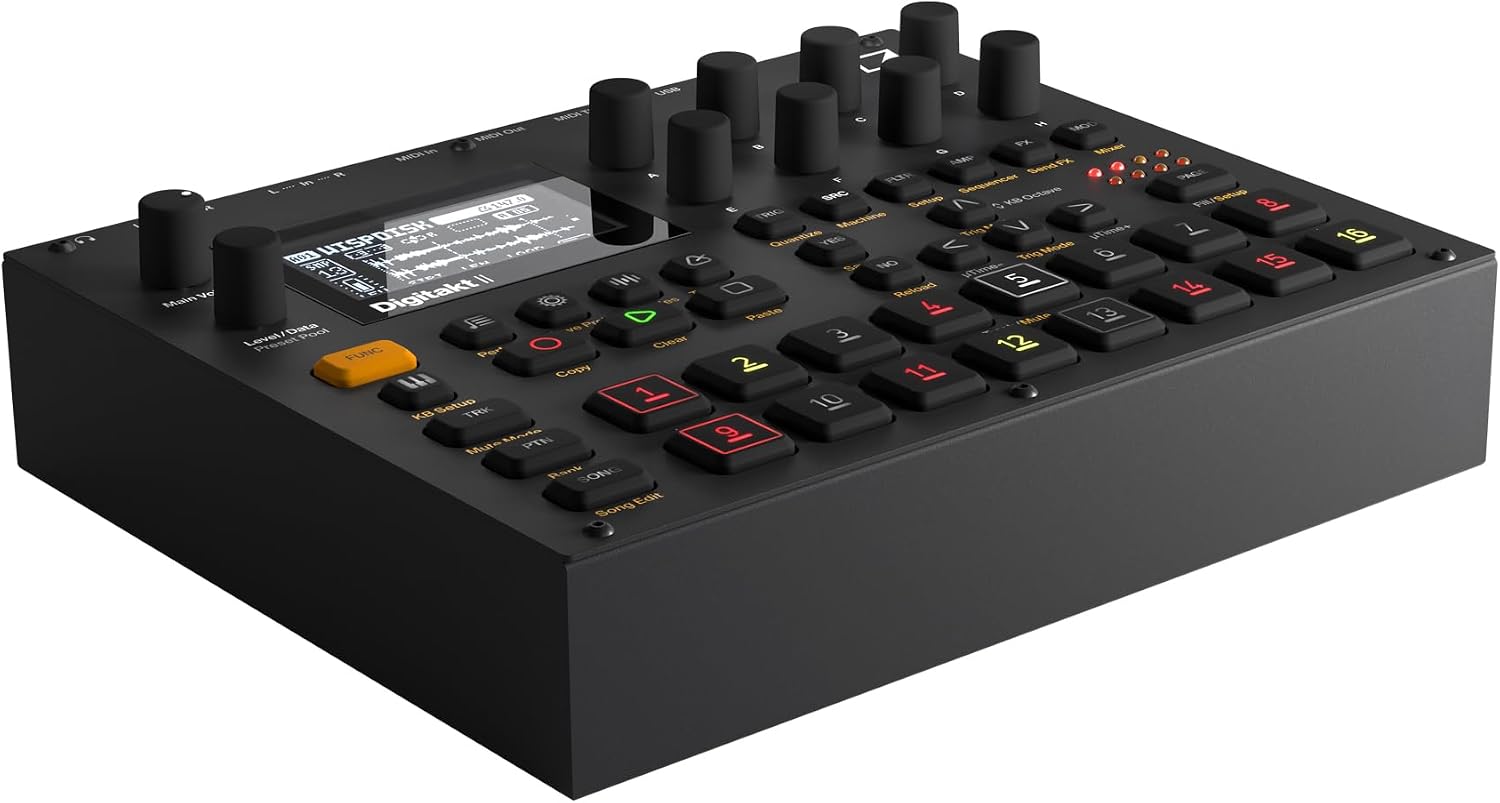
A groovebox is a self-contained hardware device that lets you make beats, sequences, and full tracks without needing a laptop or recording software—everything from programming drum patterns to layering samples happens on the box itself. Going DAWless (DAW stands for Digital Audio Workstation, i.e., software like Ableton Live or Logic) is a workflow choice, not just a gear choice: it means the hardware is your studio for writing, arranging, and often performing. In 2025–2026, three machines are dominating this conversation for producers at the intermediate-to-advanced level: the Elektron Digitakt II, the Akai MPC Sample, and the Ableton Move. Each one represents a genuinely different philosophy about how music should be made. This guide synthesizes what owners, reviewers, and the broader producer community have concluded about all three—so you can match the machine to the way your brain actually works.
| EDITOR'S PICKElektron Digitakt II 16-Track D… | Mid-tierAbleton Move Standalone Instrum… | Budget pickRoland SP-404MKII Creative Samp… | |
|---|---|---|---|
| Tracks | 16 | — | — |
| Polyphony | — | — | 32 |
| Storage | — | — | 16GB |
| Price | $1,099.00 | $499.00 | |
| See on Amazon → | See on Amazon → | See on Amazon → |
The Real Question Isn’t Features—It’s Workflow Identity
Before the spec sheet, ask yourself one question: where does your creative process start?
If you begin with samples—chopping a break, flipping a loop, building texture from found sound—that answer points somewhere different than if you start with a beat grid and build outward, or if you want a device that feels like a physical extension of a software environment you already know.
The community consensus, drawn from long-form owner threads, the Sound On Sound Digitakt II review, and MusicRadar’s MPC Sample write-up, is that all three machines are genuinely capable of finishing tracks without a computer. But the friction each machine creates at different workflow stages is what separates them. That friction is your signal.
Elektron Digitakt II: The Sequencer That Ate Everything
The most surprising narrative in Digitakt II owner communities is the conversion story. Reviewers who came expecting a modest drum computer upgrade describe something closer to a paradigm shift. One frequently cited long-form review from a self-described 15-year Akai/MPC veteran opens with the line “I was so wrong” and proceeds to compare the two machines in granular detail—concluding that the Digitakt II’s sequencer depth changes the way you think about arrangement itself.
Sound On Sound’s 2024 Digitakt II review underlines this: calling it a drum computer, they write, “undersells it considerably.” The machine is simultaneously a sampler (stereo samples, per-track LFOs, dedicated filter and amp envelopes), a synthesizer (the new analog-modeled synthesis engine per track), a drum machine (16-track step sequencer with parameter locks), and a performance sequencer (conditional trigs, probability, micro-timing per step). Sweetwater’s product overview describes the parameter-lock system—where any knob value can be “locked” to a specific step in the sequence—as the feature that keeps advanced users discovering new techniques years into ownership.
What parameter locks actually do for your music: Every step in a sequence can have a unique pitch, filter cutoff, reverb send, or any other parameter value—independently of every other step. This means a four-bar drum loop can have a hi-hat that opens exactly once on beat three of bar two, at a different volume than every other hit, with a unique reverb tail. In DAW terms, this is clip-level automation per note, without ever touching a mouse.
The tradeoff is real and the community is honest about it. CDM’s 2025 groovebox roundup notes that the Digitakt II has a “learning curve that rewards patience but punishes impatience.” The menu structure requires investment. Owners coming from an MPC—where the pad grid is the primary interface—consistently report a 2–4 week adjustment period before the Elektron approach becomes intuitive. The same MPC veteran who described his conversion explicitly said: “Do not expect MPC speed in the first two weeks. Expect MPC depth by week six.”
By the numbers — Digitakt II at a glance:
- 16 tracks (8 audio sample + 8 MIDI), stereo sampling, 1 GB RAM sample pool
- Conditional trigs: 19 conditions including probability (1:2, 1:4, etc.), fill, and neighbor
- Overbridge support for per-track USB audio/MIDI streaming to a DAW
- No internal battery; requires power adapter
Akai MPC Sample: Speed, Intuition, and the SD Card You Need to Buy Today
MusicRadar’s MPC Sample review opens with a word that recurs across nearly every owner account: intuitive. For producers with any MPC history—or even pad-based production habits from software like Maschine—the MPC Sample’s layout is a known language. Sixteen velocity-sensitive pads, a touchscreen, a familiar Q-Link knob layout, and the same MPC workflow that has been refined across the MPC One, MPC Live II, and MPC X lineups.
The MPC Sample’s positioning is deliberate. It is not the MPC One+. It is a focused, portable entry into the MPC ecosystem with a specific target: producers who want the core MPC beat-making and sampling workflow in a smaller, more affordable package. MusicRadar’s review describes it as a “future classic” in the making, noting that Akai has consistently expanded MPC firmware over time—the MPC One received meaningful updates for years after launch, and the MPC Sample inherits that update pipeline.
How it compares to the MPC One+ for beat production: The MPC One+ adds an internal drive, more RAM, a larger screen, and CV/Gate outputs for modular integration. For producers whose work stays entirely in the sample-and-beat-production world—without needing to sequence hardware synths or Eurorack—the MPC Sample covers the same creative ground at a lower price point. Where the One+ wins is in project scale (larger projects, more tracks) and hardware integration. If you are building a hybrid analog/digital live rig, the One+ is the correct tool. If you are making beats and want to focus, the Sample is the sharper knife.
The SD card situation: Almost universally, MPC Sample owners flag this within the first 24 hours: the internal storage is minimal, and an SD card is effectively a day-one requirement. The community consensus across aggregated owner reviews is to buy a UHS-I or UHS-II card in the 128GB–256GB range, formatted to exFAT. Cards formatted to FAT32 can cause issues with large sample libraries. A 64GB card works but fills fast once you start loading sample packs. Buy the card before the machine arrives.
The MPC Sample’s honest limitation is ceiling height. For producers who will eventually want to sequence external hardware at the complexity level the Digitakt II enables—or who want deep synthesis per-track—the MPC Sample will feel capped. But for producers whose identity is sample-based beat making with fast pad workflow, it is the least-friction path to finished music in this comparison.
Ableton Move: The Bridge Machine
Attack Magazine’s 2024 Ableton Move first-look describes a paradox: producers with deep Ableton Live histories report the Move as “more inspiring than expected,” while simultaneously being clear that it is not Push 2 and not meant to be. It is a new category within Ableton’s hardware lineup—a focused, battery-powered device for sketching and performing ideas that sync natively with Ableton Live but does not require it.
This is the critical clarification the community keeps making: the Move does not require an Ableton Live subscription to function as a standalone device. It ships with a version of Ableton Live Lite for desktop integration, but the standalone mode—where you make beats, load samples, and sequence without a computer—is fully functional out of the box. Live integration is an option, not a dependency.
What owners with Live histories consistently describe is that the Move changes the location of inspiration. It is portable, battery-powered, and built around a workflow that feels tactile in a way that working in the Live session view on a laptop does not. Attack Magazine notes that third-party developers have already begun building extensions and Max for Live integrations that push the Move’s standalone capabilities further, which is a signal that its ceiling is higher than it appears at first.
The tradeoff is sample manipulation depth. Compared to the MPC Sample’s chopping tools or the Digitakt II’s per-step parameter control, the Move’s sample workflow is more constrained. Producers who want to flip breaks and build complex sample architectures will hit walls. Producers who want to sketch arrangements, jam with synthesized sounds, and move ideas fluidly between hardware and their Live session will find it fits precisely where they need it.
If you already own Ableton Live and your process involves moving between laptop and hardware: the Move is the most natural fit because it speaks Live’s native language. If you are trying to escape the laptop entirely and the DAW is part of what you want to leave behind, the Move is the wrong direction.
The Decision Frame: If X, Then Y
| Your situation | The recommendation |
|---|---|
| Deep sequencer needs; willing to invest in learning curve | Elektron Digitakt II |
| MPC/pad-native workflow; focused on sample-based beats | Akai MPC Sample |
| Ableton Live user; want portable hardware that talks back to your DAW | Ableton Move |
| Building a Eurorack or analog hybrid rig with CV integration | MPC One+ or Digitakt II (Overbridge) |
| First dedicated hardware box; unsure of workflow identity | MPC Sample (lowest friction on-ramp) |
The Digitakt II is the right answer if you want a machine that will still be teaching you things in year three. The MPC Sample is the right answer if fast, intuitive beat production is the core of your practice and you want to spend time making music rather than learning a new paradigm. The Move is the right answer if your creative process is tethered to Ableton Live and you want hardware that extends that environment into the physical world.
No machine here is a wrong choice. The wrong choice is buying against your actual workflow identity because a spec sheet impressed you.
Frequently Asked Questions
Can the Elektron Digitakt II be used without ever connecting to a computer? Yes, fully. The Digitakt II is a complete standalone instrument. A computer connection via Overbridge (Elektron’s USB audio/MIDI software) adds DAW integration and per-track audio streaming, but it is entirely optional. Owners consistently report using the Digitakt II exclusively as a standalone unit for years.
How does the Akai MPC Sample compare to the full MPC One+ for beat production? For core beat production—sampling, chopping, sequencing, drum programming—the MPC Sample covers the same workflow as the MPC One+. The One+ adds more RAM, internal storage, CV/Gate outputs for hardware integration, and a larger screen. If your work is beat-making without hardware synth sequencing, the Sample handles it. If you need CV integration or larger project scale, the One+ is the upgrade.
Does Ableton Move require an Ableton Live subscription to function standalone? No. The Move operates as a standalone device without any computer or software subscription. Ableton Live Lite is included for those who want desktop integration, and a Live subscription unlocks deeper connectivity—but the standalone functionality does not depend on it.
What SD card size and format should I buy for the Akai MPC Sample? Community consensus from aggregated owner reviews: 128GB–256GB, UHS-I or UHS-II speed class, formatted to exFAT. Avoid FAT32 for large sample libraries. Buy it before the machine arrives—internal storage fills fast with even a modest sample pack collection.
Can the Roland SP-404MKII replace a laptop in a live set? Yes, with caveats. The SP-404MKII is optimized for sample playback, DJ-style performance, and real-time sample manipulation rather than in-depth sequencing. Long-run owner reviews describe it as a tool producers are still discovering features in years after purchase—particularly for live sets built around sample-triggering and effects performance. It is less suited to building complex multi-track arrangements in real time. For a live set that is performance-forward and sample-centric, it holds up as a laptop replacement. For full arrangement-style live sets, pair it with a dedicated sequencer.
Is the Elektron Digitakt II too complicated for someone coming from an MPC workflow? The MPC veteran conversion narrative in owner communities suggests: complicated at first, not permanently. The consistent report is a 2–4 week adjustment period, followed by a workflow that many describe as more powerful than the MPC paradigm for their specific needs. Sound On Sound’s review explicitly frames the learning curve as “an investment with compounding returns.” If you are willing to spend the first month learning rather than producing, the payoff is real. If you need to be making finished music on day one, start with the MPC Sample and come back to the Digitakt II when you have bandwidth to learn.