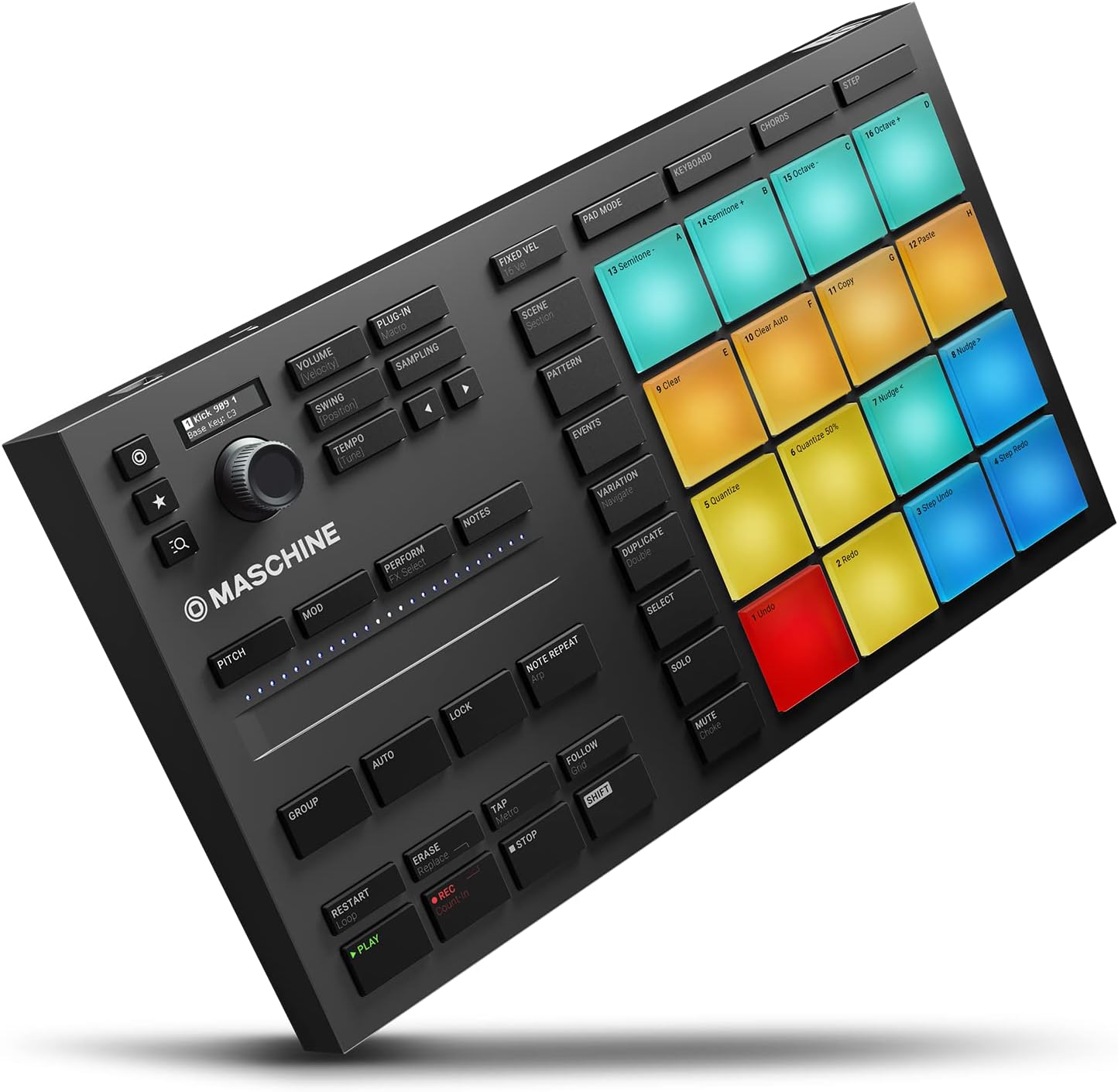
A pad controller is a hardware device with a grid of pressure-sensitive rubber pads that you tap or hit to trigger drum sounds, samples, or notes in music software. Think of it as a drummer’s alternative to a keyboard—instead of playing melodies, you’re launching kicks, snares, and hi-hats in real time or programming rhythmic patterns. These controllers plug into your computer via USB and talk to your DAW (Digital Audio Workstation—software like Ableton Live, Logic Pro, or FL Studio) using MIDI, a universal communication standard that tells software which pad you hit, how hard, and for how long. If you’re deciding between the Native Instruments Maschine Mk3, Maschine Mikro Mk3, Akai MPD218, or Akai LPD8 Mk2, you’re navigating a genuine fork in the road: each device reflects a different philosophy about what a pad controller should be. This guide breaks down the real tradeoffs so you can match hardware to workflow rather than buying on spec alone.
| EDITOR'S PICKNative Instruments Maschine Mk3… | Mid-tierAkai Professional MPD218 - USB… | Budget pickAkai Professional LPD8 - USB MI… | |
|---|---|---|---|
| Pads | — | 16 | 8 |
| Knobs | — | 6 | 8 |
| Software | — | ✓ | ✓ |
| RGB pads | — | — | ✓ |
| Note repeat | — | ✓ | — |
| Connection | — | USB | USB |
| Price | $489.00 | $115.85 | $59.00 |
| See on Amazon → | See on Amazon → | See on Amazon → |
Pad Quality: Where the Gap Is Larger Than You’d Expect
This is the one differentiator that owners return to most consistently, and the spread across these four devices is substantial.
Maschine Mk3 owners describe the pads in terms that stand out across aggregated reviews on sites like MusicRadar and in Sound On Sound’s Maschine Mk3 coverage—language like “god-tier” shows up repeatedly, with reviewers specifically inviting readers to challenge them to name something better. The pads are large, responsive, and designed to register a wide dynamic range from a ghost-note tap to a full strike. The velocity sensitivity (how hard a pad detects your hit, mapped to volume or intensity in software) is tuned for expressive finger drumming rather than binary on/off input.
The Maschine Mikro Mk3 uses the same pad technology in a smaller chassis. Synthtopia’s Mikro Mk3 overview notes the pad surface is physically smaller, which affects playing technique at higher tempos—but the sensor quality is consistent with the full Mk3.
The Akai LPD8 Mk2 sits in a different tier. Owners in aggregated reviews specifically report that single-finger light taps cause misfires—unintended triggers from a tap that wasn’t meant to fire. The effective technique that owners have converged on is two fingers hitting directly downward with deliberate force, which bypasses the misfire threshold. That’s a real constraint: if you’re building expressive finger-drumming takes, the LPD8 Mk2 requires you to adjust your technique around the hardware rather than the reverse. Attack Magazine’s pad controller workflow guide identifies this exact dynamic—pad sensitivity calibration matters most when playing live, less so when programming static grid patterns.
The MPD218 falls between these poles. MusicRadar’s MPD218 review notes adequate pad response for pattern programming, but owners who approach drumming with an expressive, drummer’s mindset—rather than a sequencer-operator mindset—report frustration. One pattern visible across reviews: non-drummers who come from melodic instrument backgrounds (woodwind and brass composers are specifically mentioned in owner accounts) tend to return the device because the tactile-physical feedback loop that makes pad controllers intuitive for rhythm players doesn’t translate to their notation-first workflow. If you’re primarily writing percussion parts for printed scores or notation software rather than producing beat-centered tracks, that’s a genuine audience qualification worth knowing before purchase.
Ecosystem Lock-In: The Maschine Conversion Arc
Native Instruments Maschine (both the Mk3 and Mikro Mk3) is not just a controller—it’s a controller-software bundle. Maschine hardware ships with Maschine software, which is a self-contained groove production environment with its own sampler, sequencer, mixer, and plugin host. This is where the ecosystem question becomes genuinely complex.
The consistent emotional arc in Maschine owner reviews follows a predictable shape: initial friction and frustration with the software’s learning curve, followed by a click moment where the workflow feels natural, followed by enthusiasm that reads almost like conversion. Sound On Sound’s Maschine Mk3 coverage documents this pattern explicitly—the software rewards commitment, and owners who push through the on-ramp describe it as reorienting their entire production approach.
One counter-narrative worth flagging: at least one Mk3 reviewer who self-describes as formerly “basically dawless” (working entirely on hardware without a computer) reports that Maschine actually converted them back to computer-assisted production—not because they abandoned hardware, but because Maschine’s Komplete/NKS integration (Native Instruments’ broader instrument library ecosystem, where NKS means Native Kontrol Standard—a protocol that lets Maschine hardware browse and control Native Instruments plugins directly from the device) made the computer-in-the-loop workflow feel hardware-like enough to accept. That’s an interesting inversion of the standard dawless-to-computer arc, and it speaks to how deeply the software integration is designed.
The practical question for intermediate producers: Can you use Maschine hardware as a standard MIDI controller without running Maschine software? The short answer, documented in Sweetwater’s product materials and confirmed across owner discussions, is limited. The Mikro Mk3 and Mk3 can send MIDI to other software, but most of the hardware display and parameter control functionality depends on Maschine software being active. If you want a pad controller that works transparently with Ableton or Logic without a dedicated companion app, the Akai devices have a significant advantage here—they operate as class-compliant MIDI devices that require no proprietary software to function.
The APC64 Variable: CV Gate and Hybrid Rig Builders
The Akai APC64 doesn’t appear in the title of this guide but surfaces consistently in comparison threads involving these four controllers, and for one specific reason that’s highly relevant to this site’s audience: it is the only controller in this competitive set with CV gate outputs.
CV (Control Voltage) is the signal format used by modular synthesizer systems—Eurorack modules, Moog DFAM, Make Noise systems, and similar hardware communicate via voltage rather than MIDI. A CV gate output on a pad controller means you can directly trigger modular percussion voices from the controller’s pads without a MIDI-to-CV converter in the chain. Reviewers who specifically praise this feature are building hybrid rigs—setups that combine a DAW or groovebox with a modular percussion voice, and where reducing the conversion chain simplifies both the signal path and the latency profile. If your production architecture includes Eurorack drum voices alongside software instruments, the APC64’s CV outputs represent a meaningful differentiator that the Maschine and MPD218 family don’t address.
By the Numbers
| Controller | Pads | Companion Software Required | CV Output | Primary Workflow Fit |
|---|---|---|---|---|
| Maschine Mk3 | 16 large, velocity-sensitive | Yes (Maschine) | No | Integrated groove production |
| Maschine Mikro Mk3 | 16 smaller, same sensor quality | Yes (Maschine) | No | Maschine software, budget entry |
| Akai MPD218 | 16 pads, 4 banks (64 total) | No | No | DAW-agnostic MIDI programming |
| Akai LPD8 Mk2 | 8 pads | No | No | Portable grid input, static patterns |
Decision Framework: If X, Then Y
By this point in the comparison, the decision logic is fairly clean. Name your constraint and follow the branch.
If pad feel and expressive finger drumming are the primary criteria: The Maschine Mk3 is the consensus choice. The pad quality gap is real and documented across enough aggregated reviews—Sound On Sound, MusicRadar, owner accounts—that it’s not anecdotal. The Mikro Mk3 delivers comparable sensor quality at a smaller footprint and lower price if you’re comfortable with the reduced pad surface area.
If you need a DAW-agnostic controller that works without proprietary software: Akai’s MPD218 is the practical answer. It functions as a standard MIDI device, maps cleanly in Ableton and Logic, and doesn’t require you to manage a companion application. Attack Magazine’s workflow guides consistently position class-compliant MIDI devices as lower-friction for producers who already have a DAW workflow they’re optimizing around rather than building from scratch.
If you’re a Maschine-first producer choosing between Mk3 and Mikro Mk3: The differentiator is display and hands-on parameter control. The full Mk3 has a larger color display that lets you navigate Maschine’s browser, mixer, and effects without touching a mouse. The Mikro Mk3 routes more operations back to the computer screen. For live performance or studio sessions where screen-avoidance matters, the Mk3 pays for the price difference. For home production where you’re already looking at a monitor, the Mikro Mk3 captures the core experience at lower cost.
If your rig includes Eurorack modular percussion voices: The APC64’s CV gate outputs make it the most technically capable option for hybrid setups. Neither Maschine nor the MPD218 addresses modular integration natively.
If you’re not a rhythm-first producer—you’re coming from melodic instruments or notation workflows: The MPD218 reviews from non-drummers are a useful signal. The tactile feedback loop that makes pads intuitive for beat-centric producers doesn’t necessarily translate to composers who think in notation. If your goal is programming percussion parts for a score rather than building beats, a MIDI keyboard with drum-kit patches may serve the workflow better than any pad controller in this group.
Frequently Asked Questions
Can the Maschine Mikro Mk3 be used as a standard MIDI controller with Ableton without running Maschine software?
Technically yes, but with significant limitations. The Mikro Mk3 can send MIDI note data to Ableton, but the onboard display, knob-to-parameter mapping, and most hardware navigation features depend on Maschine software running in the background. Per Sweetwater’s product documentation and owner accounts aggregated across forums, producers who want a clean, fully Ableton-native experience—where all hardware controls map directly without a companion app—find the integration awkward. The Akai MPD218 is the more natural choice for that use case.
Are the Akai LPD8 Mk2 pads usable for expressive finger drumming or only for grid input?
Based on owner reports aggregated across retailer reviews and community discussions, the LPD8 Mk2 pads work reliably for grid-style pattern input when you use deliberate two-finger downward strikes. For expressive finger drumming—where velocity nuance from light taps to hard hits is the point—the misfire rate on light single-finger taps is a documented constraint. Owners who finger-drum expressively consistently migrate up to Maschine-tier pad hardware.
Does the Maschine Mk3 work without a computer connected?
No—the Maschine Mk3 is not a standalone device. It requires a connected computer running Maschine software to function as intended. This is a meaningful distinction from hardware grooveboxes like the Elektron Digitakt or Roland TR-8S, which operate entirely without a computer. If standalone operation is a requirement, the Maschine controller line is not the right category.
What does the Akai APC64 CV gate output actually connect to?
CV gate outputs connect to modular synthesizer hardware that uses Control Voltage signaling—Eurorack modules, the Moog DFAM, Make Noise percussion voices, and similar analog hardware. A gate signal tells a module to trigger (fire a sound or open an envelope). This allows the APC64 to directly trigger modular drum voices from its pads without a separate MIDI-to-CV converter. For producers who don’t work with modular hardware, this feature is irrelevant; for hybrid rig builders, it’s the primary reason to choose the APC64 over alternatives in this price range.
Is the MPD218 a good choice for someone who doesn’t produce drums but wants to program percussion parts for notation software?
Probably not. The MPD218 is designed for beat-centric production workflows—triggering samples in a DAW, building patterns in real time, or performing live. Owner accounts from non-drummers who came to the device specifically for notation-adjacent percussion programming describe the workflow mismatch clearly: pads reward a physical, rhythmic playing intuition that notation-first composers don’t necessarily have. For writing percussion parts destined for a printed score or a DAW’s piano roll, a standard MIDI keyboard (playing notes in the GM drum map) typically offers a more natural entry point.