MIDI Controllers for Drum Production: Choosing Between Akai MPD, Arturia BeatStep Pro, Maschine, and Modular-Friendly Options
If you’ve been making beats in software and you’re ready to move some of that work into hardware, the first question you’ll face is deceptively simple: what do you actually put your hands on? A MIDI controller is any physical device—pads, knobs, buttons, sliders—that sends musical instructions via the MIDI protocol, a universal standard that instruments and computers adopted in 1983, to your software or hardware gear. For drum production specifically, the controller you choose shapes how you feel the music, how fast you can sequence patterns, and whether you can eventually route signals into a modular synthesizer (a system of individual electronic modules, such as Eurorack hardware, that you connect with patch cables). This article compares the most-purchased options in 2025–2026—the Akai MPD series, the Arturia BeatStep Pro, Native Instruments Maschine, and the Akai APC64—with a clear eye on pad feel, workflow depth, software dependency, and modular compatibility. By the end, you’ll have a decision framework rather than another list of specs.
| EDITOR'S PICKNative Instruments Maschine Mk3… | Mid-tierArturia BeatStep Pro Controller… | Budget pickArturia - BeatStep - Compact MI… | |
|---|---|---|---|
| Pads | — | 16 | 16 |
| Aftertouch | — | ✓ | — |
| Sequencers | — | 2 melodic + 1 drum | — |
| CV/Gate I/O | — | ✓ | — |
| Encoders | — | — | 16 |
| Included software | — | — | ✓ |
| Price | $489.00 | $249.00 | $99.00 |
| See on Amazon → | See on Amazon → | See on Amazon → |
The Axis That Actually Matters: Pad Feel
Across owner accounts aggregated by MusicRadar (in their “Best MIDI controllers 2025” feature) and Sweetwater’s Maschine Mk3 product Q&A boards, pad feel surfaces as the single most emotionally charged differentiator in this category—and the gap between products is dramatic enough to drive purchase regret.
Native Instruments Maschine Mk3 — Premium Pad Experience
Owners of the Native Instruments Maschine Mk3 consistently reach for superlatives. Phrases like “god-tier pads” and “best pads I’ve ever played” appear repeatedly in long-form owner accounts gathered by reviewers at MusicRadar and in Sweetwater’s Maschine Mk3 product Q&A. The Mk3’s large, velocity-sensitive rubber pads with adjustable sensitivity curves are widely credited with translating natural playing dynamics—ghost notes, rimshot accents, quiet hi-hat nuance—into MIDI with a reliability that owners describe as genuinely expressive rather than merely functional. If pad feel is your primary axis and you work inside Ableton Live or Reaper, the Maschine Mk3 is the quality ceiling in this price range.

Native
$489.00
In stock on Amazon
Check price on AmazonArturia BeatStep Pro — Sequencer-First Philosophy
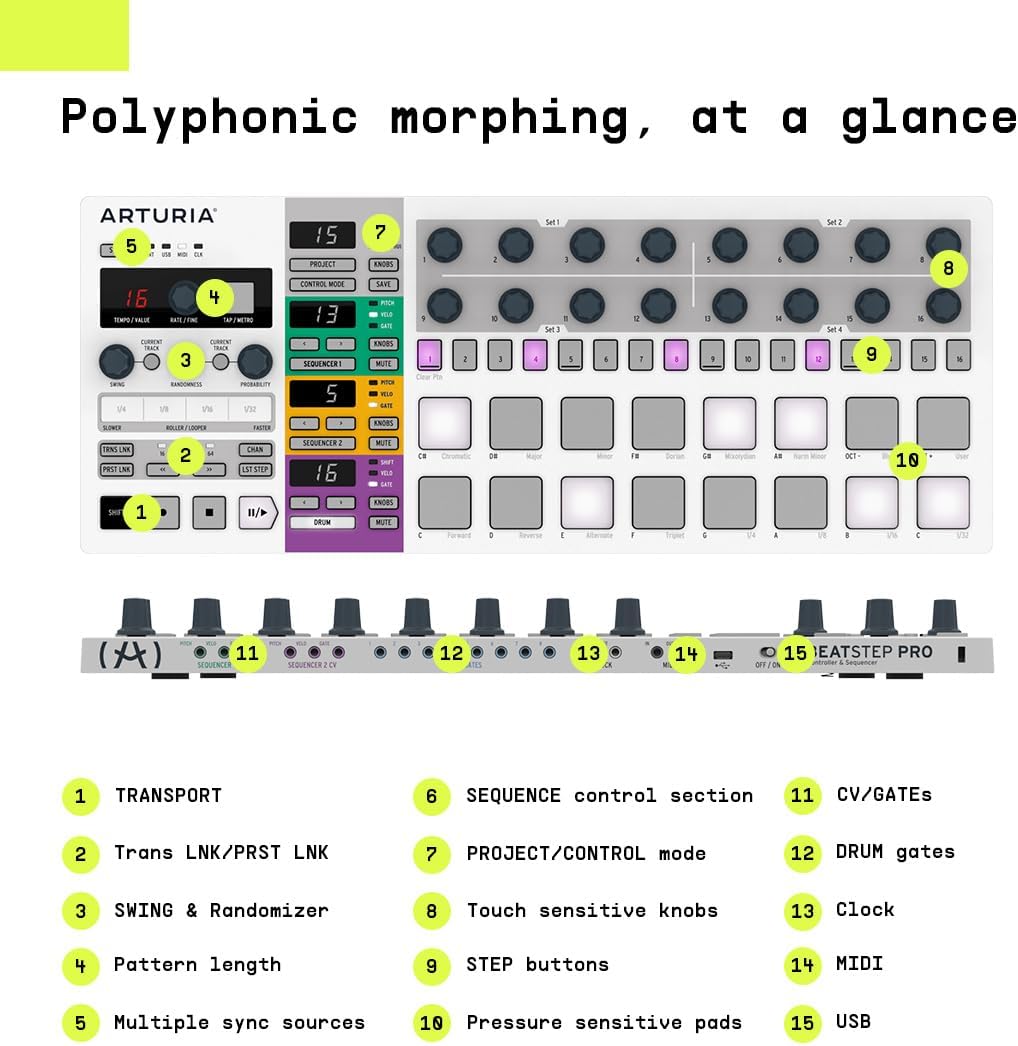
The Arturia BeatStep Pro doesn’t use velocity-sensitive pads as its primary interface; it uses a 32-step button grid optimized for step sequencing. This is not a weakness—it is a deliberate design philosophy. Sound On Sound’s BeatStep Pro review frames the device as one of the most complete standalone hardware sequencers under $300, a label that holds up in 2026. Attack Magazine’s “Getting Started with Hardware Sequencers” overview notes its “low menu depth” character as the BSP’s defining personality: two melodic tracks plus one drum track, each with 32 steps and independent time signatures, operating with enough visual logic that experienced users describe understanding the entire device without reading beyond the first session.
One recurring pattern in community coverage is buyers specifically trading away more complex, menu-driven sequencers in favor of the BSP precisely because greater depth didn’t translate into faster creative output. If you want hardware sequencing without menu complexity and you work with external synths or a live rig, the BeatStep Pro is the honest answer.
Arturia
$249.00
In stock on Amazon
Check price on AmazonAkai MPD218 and LPD8 Mk2 — Entry Points with Caveats
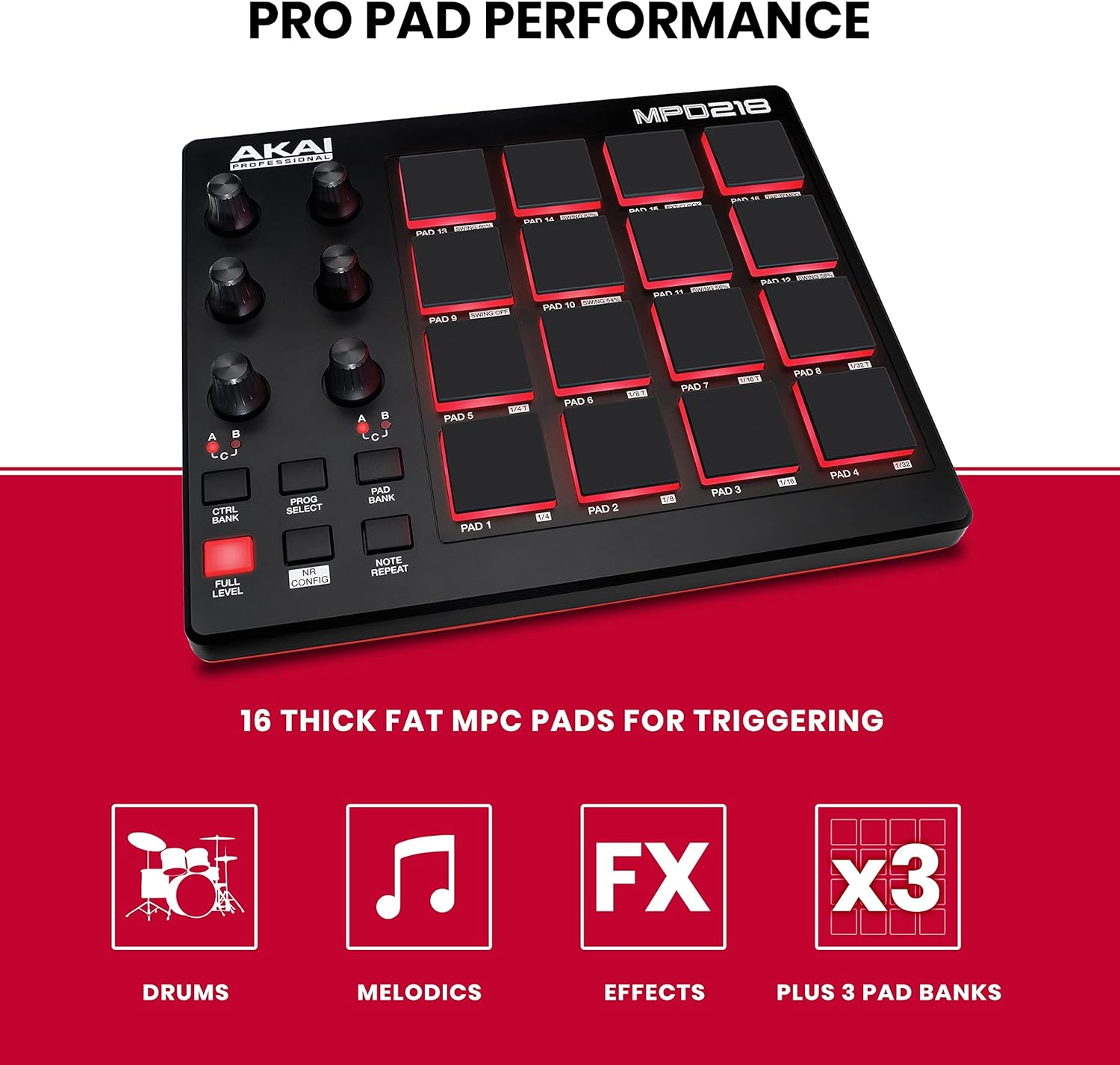
The picture at the Akai entry end of the market is different. Owners of the Akai LPD8 Mk2 and Akai MPD218 consistently report that the pads arrive stiff and require a break-in period before velocity tracking feels reliable. “A little stiff out of the box” is a pattern phrase across multiple LPD8 reviews cited in MusicRadar’s best MIDI controllers coverage. This isn’t catastrophic—many owners report the pads become comfortable after a few weeks of regular use—but it is a meaningful friction point if you’re buying for immediate studio sessions or live performance. The MPD218 does not offer hardware sequencing at all; it is a pad controller and nothing more. If you need the simplest possible MIDI pad controller for a minimal budget and can tolerate a break-in period, the MPD218 does the job.
Arturia
$99.00
In stock on Amazon
Check price on AmazonSequencing Depth: Where Each Controller Sits
Attack Magazine’s “Getting Started with Hardware Sequencers” draws a useful distinction between sequencers optimized for immediate fluency versus those optimized for maximum complexity. That axis maps cleanly onto the controllers compared here.
The BeatStep Pro occupies a rare position: genuine hardware sequencing power at a price well under the Elektron ecosystem, with a shallow enough menu structure that new owners describe getting productive in the first session. Sound On Sound’s BeatStep Pro review confirms its standalone sequencing capability as a core feature rather than an afterthought—the device runs over MIDI and CV/gate with no computer required.
The Maschine Mk3 sequences, but its sequencer lives inside the Maschine software environment. This changes the conversation entirely: you are not running a standalone hardware sequencer but a tightly integrated software-hardware system. For producers who work primarily in a DAW, this is often a strength rather than a limitation—the sequencer is deep and the pad feel is excellent—but it is a different category of tool than the BeatStep Pro.
The Akai MPD218 and LPD8 Mk2 offer no internal sequencing. They are pure MIDI trigger surfaces. If on-hardware sequence programming matters to your workflow, neither Akai entry-level pad controller belongs in your shortlist.
For producers who want maximum sequencing complexity—polyrhythm layering, parameter locks, conditional trigs—the BeatStep Pro will eventually hit a ceiling and the Elektron ecosystem becomes the logical next step. But for power without deep menus, the BSP sits in a category largely by itself at its price point.
Software Dependency: Maschine in the Real World
No controller in this comparison generates more pre-purchase anxiety than the Maschine Mk3, and nearly all of it centers on one question: how tightly is this device married to Native Instruments’ own software?
The short answer from experienced owners, as documented in Sweetwater’s Maschine Mk3 product Q&A, is: less than you fear, more than some would prefer.
Newcomers initially panic when they discover Maschine’s pads and controls are designed to work within the Maschine software environment. Owners who’ve spent real time in the workflow describe a clean solution: running Maschine as a VST plugin (a software instrument that lives inside another program) inside a DAW like Ableton Live or Reaper. In this configuration, Maschine handles its own internal sequencing and sound design while the host DAW manages the overall session—audio routing, recording, mixing. Sweetwater’s Maschine Mk3 product Q&A confirms this workflow is officially supported and widely practiced.
What Maschine does not do well is function as a generic MIDI pad controller the way an Akai MPD does. The pads can send MIDI out, but the workflow is optimized for the Maschine ecosystem. If your goal is a flexible, software-agnostic pad surface that works with any DAW without configuration overhead, the Akai MPD range is more honest about what it is.
The trade-off is clear: Maschine gives you better pads and a deeper integrated environment at the cost of software commitment. The Akai MPD range gives you immediate plug-and-play pad triggering with lower upfront complexity—and lower upfront pad quality.
Modular Integration: CV/Gate and the Hybrid Rig
For producers building a hybrid setup that bridges DAW production and Eurorack modular synthesis (a hardware format where individual modules communicate via CV/gate signals—continuous voltage, rather than MIDI, that controls pitch, timing, and modulation), the controller comparison shifts significantly.
The Akai APC64 is the only controller in this group with native CV/gate outputs—physical jacks that send voltage signals directly to Eurorack modules without any additional interface hardware. Perfect Circuit’s APC64 product overview specifically highlights this as a differentiator for hybrid Ableton-plus-modular rigs, calling it the clearest path to direct modular integration from a controller in this category and price range.
The BeatStep Pro also offers CV/gate output from its melodic tracks—a significant point in its favor for modular work, though its CV implementation is sequencer-driven rather than pad-driven. If your modular percussion work involves sending sequenced pitch and gate voltage to voices like a Moog DFAM or Noise Engineering Basimilus Iteritas, the BeatStep Pro handles that natively.
Neither the Maschine Mk3, MPD218, nor LPD8 Mk2 offer direct CV output in their standard configurations. Each requires a separate MIDI-to-CV interface (a device that translates MIDI messages into CV voltage), which adds cost and a cable in the signal path.
If your production setup involves Eurorack percussion voices and you want to avoid a separate interface, the APC64 and BeatStep Pro are the two controllers in this field that can speak voltage natively.
The LPD8 Setup Trap and How to Avoid It
A practical note that surfaces consistently in LPD8 Mk2 owner accounts deserves its own space: the MPC Beats auto-setup workflow—the software that ships with many Akai products—is built around the wireless version of the LPD8. Wired LPD8 Mk2 users report frustrating behavior when they follow the standard MPC Beats setup flow, including unresponsive pads and broken mapping, until they locate and install the separate LPD8 editor software available through Akai’s support site.
This is not obvious from the packaging or the quick-start guide. If you’re buying the wired LPD8 Mk2, download the dedicated editor before your first session.
Decision Framework: If X, Then Y
After reviewing editorial coverage from Sound On Sound, MusicRadar, Attack Magazine, Perfect Circuit, and Sweetwater, along with aggregated owner reports, the clearest decision rules are:
If pad feel is your primary axis and you work inside Ableton or Reaper, the Maschine Mk3 is the quality ceiling in this price range. Accept the software ecosystem. Run it as a VST. The pad quality is in a genuinely different tier.
If you want hardware sequencing without menu complexity and you work with external synths or a live rig, the Arturia BeatStep Pro is the honest answer—especially if you’ve tried a more complex sequencer and found yourself fighting the interface rather than making music.
If you’re building a Eurorack-adjacent hybrid rig and need CV output without a separate interface, shortlist the Akai APC64 first, with the BeatStep Pro as a strong alternative if your CV needs are sequencer-driven rather than pad-triggered.
If you need the simplest possible MIDI pad controller for a minimal budget and can tolerate a break-in period, the Akai MPD218 does the job. Go in knowing about the stiffness pattern and plan accordingly.
If you’re on the smallest budget and primarily triggering samples in a DAW, the LPD8 Mk2 works—but download the editor software before you open the box.
Frequently Asked Questions
Do Maschine Mk3 pads work as a standard MIDI controller in Ableton without the Maschine software? Partially. The pads can transmit MIDI, but the device is optimized for the Maschine software environment. Most experienced owners, as documented in Sweetwater’s Maschine Mk3 product Q&A, recommend running Maschine as a VST plugin inside Ableton rather than using it as a generic MIDI surface—you get full pad performance and the Maschine sequencer while Ableton handles your overall session.
Why does the Akai LPD8 Mk2 behave strangely in MPC Beats and how do I fix it? The MPC Beats auto-setup is built for the wireless LPD8 variant. Wired LPD8 Mk2 users need to install the separate LPD8 editor software from Akai’s support site to configure pad mapping and sensitivity correctly. This is not included in the standard quick-start flow.
Does the Arturia BeatStep Pro work without a computer for standalone hardware sequencing? Yes. The BeatStep Pro is designed for standalone operation over MIDI and CV/gate with no computer required. Sound On Sound’s BeatStep Pro review confirms its standalone sequencing as a core feature, not an afterthought.
Can the Akai APC64 send CV to Eurorack modules directly? Yes. The APC64 includes CV/gate outputs that can send voltage to Eurorack modules without a separate MIDI-to-CV interface. Per Perfect Circuit’s APC64 product overview, this is the hardware’s clearest differentiator for producers building hybrid DAW-modular rigs.
How do pad sensitivity and velocity response compare between the Maschine Mikro Mk3 and the Akai MPD range? Based on aggregated owner reports cited in MusicRadar’s best MIDI controllers coverage, the Mikro Mk3 pads—smaller than the full Mk3 but using the same underlying sensor technology—consistently outperform the MPD218’s pads for velocity sensitivity and break-in behavior. MPD218 owners report an adjustment period; Mikro Mk3 owners rarely surface the same complaint.
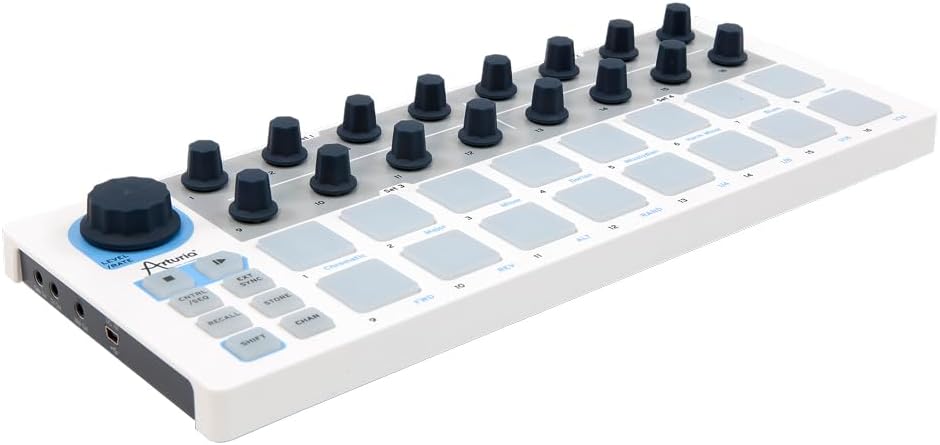
Is the original Arturia BeatStep still worth buying in 2025–2026, or should I step up to the BeatStep Pro? The BeatStep Pro’s additional drum track, three independent sequencer lanes, and broader CV implementation make it the more complete tool for most drum production contexts. The original BeatStep functions primarily as a single-channel step sequencer and MIDI/CV controller. For drum production specifically, the Pro is the version the community recommends unless budget is the hard constraint. Attack Magazine’s hardware sequencer overview supports this framing, noting the Pro’s multi-track architecture as its key advantage over single-channel alternatives.