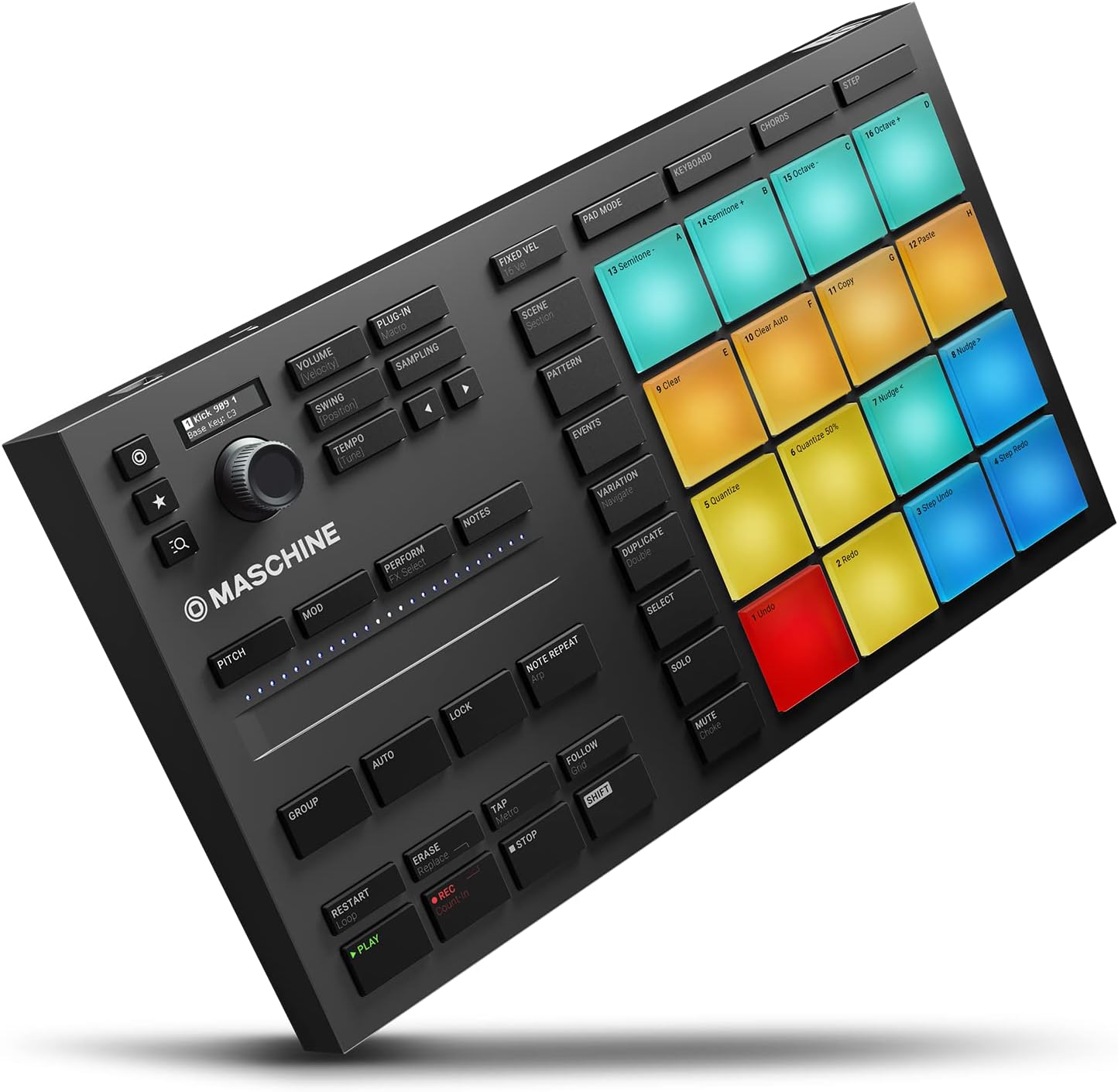
If you’ve been shopping for a pad controller or live performance hub, you’ve probably landed on two names that keep appearing in the same breath: Native Instruments’ Maschine ecosystem and the Akai APC64. Both are hardware devices — physical boxes covered in pressure-sensitive rubber pads and buttons — that sit between your hands and your music software, letting you trigger sounds, arrange clips, and build beats without staring at a mouse cursor. But they approach live electronic performance from very different philosophies, and picking the wrong one for your workflow is an expensive, frustrating mistake. This guide maps the genuine tradeoffs so you can walk into your decision with eyes open — whether you’re finalizing a purchase or just trying to understand what you’d be committing to.
Here’s the short version before we go deep: Maschine is a full production ecosystem that happens to perform live; the APC64 is a performance-first controller that leans hard on Ableton Live’s session view. Everything downstream of that sentence is detail — but the detail matters a lot when you’re building a stage rig or a studio workflow around hardware that costs several hundred dollars and shapes how you work for years.
| EDITOR'S PICKNative Instruments Maschine Mk3… | Mid-tierArturia BeatStep Pro Controller… | Budget pickArturia - BeatStep - Compact MI… | |
|---|---|---|---|
| Pads | — | 16 | 16 |
| Sequencers | — | 2 melodic, 1 drum | — |
| Encoders | — | — | 16 |
| Aftertouch | — | ✓ | — |
| Velocity pads | — | ✓ | — |
| MIDI/CV/Gate I/O | — | ✓ | — |
| Price | $489.00 | $249.00 | $99.00 |
| See on Amazon → | See on Amazon → | See on Amazon → |
The Maschine Ecosystem: A Production Brain That Goes Live
Native Instruments Maschine — particularly the Maschine Mk3 and the more compact Maschine Mikro Mk3 — is what happens when a company decides that a hardware controller and a software DAW (Digital Audio Workstation, a program for recording and arranging music) should be two halves of a single instrument. The hardware talks to NI’s Maschine software, and together they form a closed loop: you can browse sounds, sequence patterns, mix levels, and perform sets almost entirely from the hardware, with the software running in the background.
The onboarding anxiety is real and well-documented. Sound On Sound’s Maschine Mk3 review captures the pattern that repeats across forum threads and YouTube walkthroughs: new owners initially “freak a bit” about the software dependency and the non-standard workflow, then convert once the logic clicks. The workflow is genuinely different from click-and-drag DAW production — it’s more gestural, more physical — and owners consistently describe it as more fun, not just different. That shift in tone from anxiety to enthusiasm is one of the more reliable signals in consumer electronics reviews.
The pads are the anchor feature. Across aggregated reviews at MusicRadar and Sound On Sound, Maschine’s pad quality receives more consistent praise than almost any other attribute. The velocity sensitivity (how hard you hit a pad changes the volume and character of the sound) and the pressure response are frequently described as class-leading. One reviewer explicitly invited readers to name a pad controller with better feel — a rhetorical challenge that, as of 2026, hasn’t been convincingly answered in mainstream coverage.
The tradeoff the ecosystem imposes is real though: you are inside Maschine’s world. The software is not a general DAW. If your live set involves Ableton Live’s clip launcher, complex send-return routing that you’ve spent months building, or VST plugins (third-party instrument software) outside NI’s library, integrating Maschine as a controller rather than a host takes extra setup work. CDM’s coverage of the Mikro Mk3 walks through how to route Maschine as a plugin inside Ableton or standalone — possible, but not the path of least resistance.
The Akai APC64: Built for the Stage, Constrained by the Screen
The Akai APC64 is a different animal. Where Maschine tries to pull you away from the computer screen, the APC64 is explicitly designed around Ableton Live’s session view — a grid of clips (short musical phrases) that you launch and combine in real time to build a live performance. The hardware maps directly onto that grid, putting clip launching under your fingers and freeing your eyes from the laptop.
MusicRadar’s APC64 review highlights two features that owners describe as genuinely performance-changing: the step sequencer (a mode where you program rhythms by switching buttons on and off in sequence, rather than playing them in real time) and the CV outputs. CV stands for Control Voltage — an analog electrical signal used by modular synthesizers and vintage hardware to communicate pitch, timing, and modulation. The APC64 ships with physical CV output jacks, which means it can send signals directly to Eurorack modular gear without an additional interface. For producers who sit at the intersection of Ableton and modular synthesis, that’s a significant bridge.
The friction points are equally consistent across reviews. The touch strips — elongated touch-sensitive controls that replace traditional knobs or faders — require real acclimation. Owners describe a learning curve that doesn’t flatten quickly; the strips feel imprecise compared to physical knobs, particularly under stage conditions. More structurally, MusicRadar’s review flags the absence of a display as a meaningful workflow dependency: without a screen on the hardware, you are reading information from your laptop, which means the APC64 feels — in one reviewer’s phrase — “mostly computer-based.” That’s not a flaw if you’re comfortable performing behind a laptop; it’s a significant concern if you’re trying to minimize screen time on stage.
Side-by-Side: The Numbers That Shape the Decision
| Feature | Maschine Mk3 | Akai APC64 |
|---|---|---|
| Standalone (no computer) | No | No |
| Dedicated display on hardware | Yes (color screen) | No |
| CV outputs for modular | No | Yes (2× CV, 2× gate) |
| Native step sequencer | Yes (in Maschine software) | Yes (hardware-native) |
| Primary DAW integration | Maschine software (NI) | Ableton Live |
| Pad count | 16 | 64 |
Neither device operates fully standalone — both require a connected computer to function. That single fact rules out both units for performers who need to leave the laptop at home.
Where the BeatStep and BeatStep Pro Fit In
No comparison of live performance controllers in 2026 is honest without acknowledging Arturia’s BeatStep line. The original BeatStep is a compact, rugged sequencer and MIDI (Musical Instrument Digital Interface — the universal language hardware uses to communicate) controller that costs a fraction of either the Maschine or APC64. Owners consistently highlight two things: the build quality (metal chassis, genuinely durable under road conditions) and the scale-conforming sequencer, which can lock your melodic sequences to musical scales so accidental wrong notes are filtered out automatically. For experimental and jazz-adjacent live performance, Synthtopia’s coverage notes that BeatStep owners describe it as an instrument that “ages well” — its limitations become a creative constraint rather than a liability.
The BeatStep Pro extends the concept significantly for drum sequencing specifically. Where the original BeatStep has one sequencer track, the BeatStep Pro offers three independent sequencers — two melodic/polyphonic and one dedicated drum track with 16 channels. For rhythm synthesis workflows, that drum sequencer is the differentiator: you can sequence 16 separate drum voices independently, with per-step probability and randomization controls. Attack Magazine’s coverage of hardware controllers in live performance contexts describes the BeatStep Pro as particularly well-suited to performers who want to improvise structure in real time, not just trigger pre-built clips.
Is the BeatStep Pro still worth buying in 2026? The community consensus, as aggregated across Synthtopia’s coverage and synthesizer forum discussion, is a careful yes — with the caveat that it has not received meaningful firmware updates in several years and Arturia’s attention has shifted toward newer products. It remains a best-in-class option for its specific use case: hardware-native MIDI and CV sequencing across multiple tracks, at a price point well below the Maschine or APC64.
The Decision Framework
The tradeoffs here resolve into a fairly clean decision tree if you’re honest about your actual workflow:
If your live set is built in Ableton Live and you want to stay there — the APC64’s deep Ableton integration, hardware step sequencer, and CV outputs for modular gear make it the natural choice. Accept the touch strip learning curve and the screen dependency.
If you want a production-to-performance pipeline in one ecosystem — Maschine Mk3 is the answer, especially if pad feel matters to you and you’re willing to invest time learning NI’s software. The workflow anxiety that new owners report is real but temporary; the conversion rate among persistent users is high.
If you’re running a modular-heavy rig and need a sequencer bridge — the BeatStep Pro remains competitive, particularly if you need CV and MIDI sequencing at a lower price point than either flagship.
If your goal is to minimize computer dependency on stage — none of these three devices solves that problem cleanly. All require a connected laptop. For computer-free performance, the decision shifts entirely toward dedicated hardware drum machines.
Frequently Asked Questions
Can Maschine Mikro Mk3 be used as a standard MIDI controller with Ableton without the Maschine software? Yes, but with significant limitations. CDM’s documentation walkthrough confirms that the Mikro Mk3 can output MIDI to Ableton Live, but the deep integration — sound browsing, pattern sequencing, the color-coded display — requires the Maschine software running simultaneously. Using it purely as a MIDI pad controller wastes most of what you paid for.
Does the APC64 work without Ableton or is it Ableton-only? The APC64 can output standard MIDI to other software, and its CV outputs function independently of any software. However, Sweetwater’s product overview makes clear that the clip-launching grid, the step sequencer integration, and the display feedback are all designed around Ableton Live. In other DAWs, it functions as a generic MIDI controller with pads — functional, but a shadow of its intended role.
What is the difference between the BeatStep and BeatStep Pro for drum sequencing specifically? The original BeatStep has a single 16-step sequencer. The BeatStep Pro adds a dedicated 16-channel drum sequencer with per-step controls, plus two additional melodic sequencers. For drum synthesis workflows, the Pro is the meaningful choice; the standard BeatStep is better suited to melodic sequencing or simple clock duties.
Do the APC64 CV outputs work with Eurorack modular gear directly? Yes. MusicRadar’s APC64 review confirms the CV outputs are 0–10V, which is the standard Eurorack voltage range. You can connect them directly to Eurorack modules using standard patch cables. Gate outputs are also present for triggering envelopes and drum voices.
Can Maschine Mk3 operate standalone without a computer connected? No. As of 2026, neither the Maschine Mk3 nor the Maschine Mikro Mk3 functions without a connected computer running the Maschine software. This is a firm architectural limitation, not a firmware gap.
Is the BeatStep Pro still worth buying in 2024 or has it been superseded? Despite its age and the lack of recent firmware updates, Synthtopia’s coverage and community consensus suggest it remains worthwhile for its specific niche: multi-track hardware MIDI/CV sequencing at mid-range pricing. It has not been superseded in a directly comparable product. If its feature set matches your workflow, the value case is still solid.