If you’ve ever watched a drummer play live and thought, I want that much rhythmic control but in a box I can program—that’s essentially what a hardware sequencer does. A sequencer is a device that stores a pattern of musical events (notes, drum hits, tempo changes) and fires them off automatically, in sync, so your instruments play themselves in a repeatable loop while you focus on shaping the sound. Arturia, a French instrument company well-known in the electronic music world, makes three sequencers and controllers that keep showing up in hardware drum rig conversations: the compact BeatStep, the feature-heavy BeatStep Pro, and the keyboard-plus-sequencer hybrid KeyStep 37. This guide breaks down what each one actually does, where it earns its place in a drum rig, who it’s really built for, and—critically—when you’d be better served by something else. If you have a gear decision pending, the tradeoffs and decision rules below are designed to get you to a confident answer fast.
| EDITOR'S PICKArturia DrumBrute Impact Analog… | Mid-tierArturia BeatStep Pro Controller… | Budget pickArturia - BeatStep - Compact MI… | |
|---|---|---|---|
| Type | Analog Drum Machine | Controller & Sequencer | Controller & Sequencer |
| Pads | — | 16 | 16 |
| Encoders | — | — | 16 |
| Sequencers | — | 2 Melodic + Drum | — |
| Aftertouch | — | ✓ | — |
| Velocity Sensitive | — | ✓ | — |
| I/O | — | MIDI/CV/Gate | — |
| Price | $299.00 | $249.00 | $99.00 |
| See on Amazon → | See on Amazon → | See on Amazon → |
BeatStep vs. BeatStep Pro: The Core Tradeoff
These two share a name and a family resemblance, but they’re aimed at meaningfully different workflow needs.
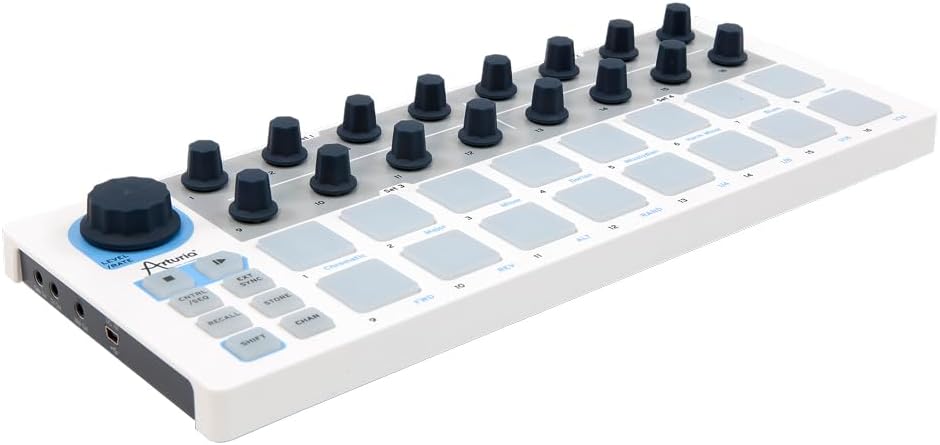
The original BeatStep (the smaller, older sibling) is a 16-pad grid controller and step sequencer that connects over USB, MIDI DIN, or analog clock/gate. Owners who’ve lived with it long-term consistently describe it as a lightweight, road-durable workhorse—knobs and pads that hold up through years of use, a form factor light enough to slide into a laptop bag, and a plug-and-play simplicity that makes it useful for quick sessions. For someone who wants a tactile MIDI pad controller that can also sequence a drum machine’s MIDI input, it punches above its price point. Synthtopia’s coverage of Arturia’s BeatStep lineup notes it as a gateway device that integrates cleanly with most MIDI-capable hardware without demanding much setup.
The BeatStep Pro, on the other hand, is a different animal built for a different operator. It offers three independent sequencers running simultaneously—two melodic/chromatic sequencers (for synths and basslines) and one dedicated drum sequencer with 16 individual drum tracks, each with up to 16 steps. That drum sequencer can send MIDI notes to a drum machine, fire analog gate signals directly into a Eurorack modular system, or do both at once. Sound On Sound’s BeatStep Pro review calls it one of the more flexible mid-priced sequencers for hybrid analog/MIDI rigs, specifically praising its ability to run independent time signatures across its three sequencers simultaneously—a feature that becomes essential once you’re building polyrhythmic grooves.
By the Numbers
| Device | Sequencer Tracks | CV/Gate Outputs | MIDI DIN | Max Steps per Track |
|---|---|---|---|---|
| BeatStep | 1 (16-step) | 1 pitch CV + 1 gate | 1 out | 16 |
| BeatStep Pro | 3 (2 melodic + 1 drum) | 4 CV + 4 gate | 1 in / 1 out | 64 |
| KeyStep 37 | 1 melodic | 1 pitch CV + 1 gate | 1 out | 64 |
The decision rule here is fairly clean: if your drum rig is MIDI-only and you want a portable pad controller with basic step sequencing, the BeatStep is enough. If you need to sequence drums and one or two other synth voices simultaneously—or if you need to talk to Eurorack modules via CV/gate—the BeatStep Pro is the right level of tool.
The BeatStep Pro in a Hybrid Hardware Rig
This is where the BeatStep Pro earns its reputation. Across aggregated owner reports on platforms like Sweetwater’s product review section and Perfect Circuit’s community notes, the pattern that emerges is a device that scales gracefully from bedroom studio to live stage without requiring a laptop as the centerpiece.
A few real-world use cases worth naming explicitly:
The Eurorack connection. The BeatStep Pro’s four CV outputs and four gate outputs let it act as the master clock and pattern brain for a modular Eurorack system. Each gate output can trigger a separate drum voice—kick, snare, hi-hat, percussion—while the CV outputs handle pitch for melodic modules. For a rig built around something like a Make Noise Manis Iteritas or a Moog DFAM (Drummer From Another Mother, Moog’s semi-modular percussion synthesizer), the BeatStep Pro is one of the most cost-efficient ways to add a proper multi-track drum sequencer without committing to a full Eurorack sequencer module.
The DrumBrute Impact pairing. One real-world hybrid rig that owners describe pairs the Arturia DrumBrute Impact (Arturia’s standalone analog drum machine) with the BeatStep Pro over MIDI, while simultaneously running a BeatBuddy (a drum machine designed for live performance with a foot-pedal interface) on a separate MIDI channel. The BeatStep Pro handles pattern switching and step programming for the DrumBrute Impact’s individual drum voices, while the BeatBuddy manages song-level structure and fills. It’s an unusual rig, but it illustrates how the BeatStep Pro’s independent MIDI channels and simultaneous sequencer tracks make it a flexible hub rather than just a pattern box.
The DAW-agnostic angle. One frequently underserved perspective in BeatStep Pro discussions is non-Ableton users. A recurring theme in owner reports is that the BeatStep Pro works cleanly across multiple DAWs—including Reaper, which is popular among budget-conscious producers and engineers who find Reaper’s pricing model and flexibility more practical than subscription alternatives. Per Sweetwater’s product overview, the BeatStep Pro is class-compliant over USB, meaning it doesn’t require proprietary drivers and maps readily into any DAW that handles standard MIDI. Reaper users specifically note that Arturia’s MIDI Control Center software makes remapping straightforward without deep menu-diving.
The ‘complexity refugee’ use case. There’s a specific buyer archetype worth naming: producers who’ve come off highly algorithmic sequencers—devices like the Oxi One MK2, which offers probabilistic note generation, Euclidean rhythms, and multi-dimensional pattern morphing—and found that the depth creates decision fatigue rather than creative flow. Owners who’ve made this transition report that the BeatStep Pro’s more direct, step-based paradigm (you program steps, you hear them, you adjust) feels immediately satisfying in a way that complex generative tools sometimes don’t. The tradeoff is intentional constraint: you get less emergent variation, more repeatable groove. For live performance contexts—where you need to know exactly what’s going to fire at bar 3—that predictability is a feature.
The live performance angle is real. The BeatStep Pro has found an audience well outside the typical “young bedroom producer” demographic. Owners include working jazz musicians with live performance backgrounds who use it as a reliable rhythmic backbone in improvisational contexts, appreciating its tactile knobs and the ability to make real-time changes to pattern length and tempo without menu navigation.
Where the KeyStep 37 Fits Into a Drum Rig
The KeyStep 37 is primarily a keyboard controller—it has 37 mini-keys with velocity sensitivity—but it includes a capable step sequencer and an arpeggiator (a feature that automatically plays notes of a chord in a running pattern rather than all at once). For drum rig applications specifically, the KeyStep 37’s role is narrower but real: it’s the right tool when you want to play melodic lines and trigger drum voices from a single controller, particularly when interfacing with Eurorack or MIDI-capable percussion synthesizers.
The feature that consistently surprises owners is the mutation function in the arpeggiator. Mutation introduces controlled random variation into an arpeggio pattern—slightly shifting notes, altering timing, or reordering the sequence—without fully randomizing it. MusicRadar’s KeyStep 37 review highlights this as an unexpected generative bonus for a device positioned primarily as a keyboard controller. For drum rig producers who want a melodic controller that can also introduce evolving rhythmic or melodic patterns over a static drum groove, the mutation function adds genuine compositional value that owners describe as “just enough randomness.”
The aftertouch question comes up constantly in owner discussions: the KeyStep 37 does not have aftertouch. Aftertouch is a keyboard feature that detects continued pressure after a key is pressed and sends that as an expressive MIDI signal—useful for vibrato, filter sweeps, or modulation without a separate knob. This is a meaningful absence if expressive playing is a priority. If aftertouch matters to your workflow, the KeyStep 37 is not the answer; look at the KeyStep Pro or step up to a full MIDI keyboard with aftertouch.
Decision rule for the KeyStep 37: If your drum rig already has a sequencer (a Digitakt, a Rytm, a BeatStep Pro) and you need a keyboard input for melodic voices plus Eurorack CV connectivity, the KeyStep 37 is a clean choice. If you’re trying to build a drum sequencer from the KeyStep 37, it can do it via MIDI note mapping to drum channels, but it’s not the native workflow the device was designed for—the BeatStep Pro will feel more natural.
Frequently Asked Questions
Does the Arturia BeatStep Pro work with Reaper and other non-Ableton DAWs? Yes. The BeatStep Pro is class-compliant USB MIDI, meaning it works with any DAW that handles standard MIDI without needing proprietary drivers. Per Sweetwater’s product overview, Arturia’s MIDI Control Center software—which handles device configuration—runs on both Mac and Windows. Owners using Reaper specifically report straightforward integration, with MIDI channels mapping cleanly to Reaper’s track routing. This is a real differentiator for producers who find Ableton’s workflow or pricing model a poor fit.
What is the difference between the BeatStep and BeatStep Pro for drum sequencing? The BeatStep has one 16-step sequencer and sends MIDI or basic analog clock—useful for sequencing a single drum machine over MIDI. The BeatStep Pro has a dedicated 16-track drum sequencer (each track independently programmable), plus two additional melodic sequencers, CV/gate outputs for Eurorack, and the ability to run independent time signatures simultaneously. For serious drum sequencing in a hardware rig, the BeatStep Pro is the purpose-built tool.
Can the BeatStep Pro send CV gate signals to Eurorack modules? Yes. The BeatStep Pro has four gate outputs and four CV outputs accessible via 3.5mm mini-jack connections—the standard format for Eurorack. Gate outputs can trigger drum voice modules directly; CV outputs handle pitch. Per Perfect Circuit’s product listing notes, this makes it a capable Eurorack sequencer hub at a price well below most dedicated modular sequencer modules.
Does the KeyStep 37 have aftertouch? No. The KeyStep 37 does not include aftertouch. If aftertouch is a priority—for expressive filter modulation, vibrato, or MPE-adjacent playing—the KeyStep 37 is not the right fit. The KeyStep Pro (a larger, more expensive model in Arturia’s lineup) includes aftertouch.
How do you connect the BeatStep Pro to the Arturia DrumBrute Impact? The most direct connection is a standard MIDI DIN cable from the BeatStep Pro’s MIDI Out port to the DrumBrute Impact’s MIDI In port. From there, the BeatStep Pro’s drum sequencer sends MIDI notes that trigger the DrumBrute Impact’s individual drum voices, with each voice responding on its assigned MIDI note number. Arturia’s MIDI Control Center software lets you remap which MIDI notes trigger which drum voice on the Impact, so custom mappings are achievable without hardware modifications. USB MIDI is also an option if both units are connected to a computer acting as a MIDI router, though the direct DIN connection is simpler for standalone live rigs.